Thursday, 26 October 2017

How to Debug a Completed SAP Background Job?

How to Debug a Completed SAP Background Job?


It is easy to debug an error job to find out the cause of the error. To debug the background job, go to transaction code SM37 and display the jobs.

First we need to keep a break-point in the program, so that the control stops at the break-point when the debugger is switched on. To find the name of the program, select the job that we want to debug and press step in the application toolbar.


Display the program by using the Menu Goto –> Program.

Keep a break-point in the program and go back to Job overview screen.


Again select the job that we want to debug and enter JDBG in the command field and press enter.


Once JDBG is entered in the command field the debugger will get switched on. Now press F8 to reach the break-point in the program.


Now we can analyze the program for the cause of the error.

Monday, 16 October 2017

BDC PROGRAM FOR FB75 TRANSACTION


*************************************************************************
* PROGRAM TITLE   : ZBDC_FB75
* MODULE          : FI
* PROGRAM TYPE    : BDC PROGRAM
* INPUT           : EXCEL FILE
* OUTPUT          : STANDARD TRANSACTION
* CREATED BY      : PRATIK PRAKASH KAMBLE
* CREATION DATE   : 14.10.2017
*-----------------------------------------------------------------------
* DESCRIPTION : FB75 TRANSACTION BDC PROGRAM
************************************************************************
* Modification history:
* ----------------------------------------------------------------------
* DATE |User ID |TS
* ----------------------------------------------------------------------
************************************************************************


REPORT ZFB75_TESTS NO STANDARD PAGE HEADING LINE-SIZE 255.

INCLUDE ZFB75_TOP.

INCLUDE ZFB75_FORMS.


START-OF-SELECTION.

  PERFORM UPLOAD_FILE.

  PERFORM CALL_BDC.


*&---------------------------------------------------------------------*
*&  Include           ZFB75_TOP
*&---------------------------------------------------------------------*


DATA: TEXT(4096) TYPE C OCCURS 0.

DATA:   BDCDATA          LIKE BDCDATA OCCURS 0 WITH HEADER LINE.
DATA:   MESSTAB         TYPE STANDARD TABLE OF BDCMSGCOLL,
             GT_MESSTAB  TYPE STANDARD TABLE OF BDCMSGCOLL,
             GV_STRING     TYPE STRING,
             LV_CHAR          TYPE CHAR1250,
             LV_CHAR1        TYPE CHAR1250,
             LS_CTU             TYPE CTU_PARAMS.

FIELD-SYMBOLS <LS_MESSTAB> TYPE BDCMSGCOLL.           "FOR MESSAGE

*&---------------------------------------------------------------------*
*& DATA DECLARATION
*&---------------------------------------------------------------------*
TYPES: BEGIN OF ST_MESSAGE,
        SR_NO     TYPE I,
        LV_MSGTYP TYPE STRING,
        LV_CRSTXT TYPE CHAR1250,
       END OF ST_MESSAGE.

TYPES: BEGIN OF TY_FB70,
        SERIAL    TYPE I,
        ACCNT     TYPE INVFO-ACCNT,                  "Customer No.
        BLDAT(10) TYPE C,                                       "Doc Date
        XBLNR     TYPE INVFO-XBLNR,                   "Reference
        WAERS     TYPE INVFO-WAERS,                 "Currency Key
        BUPLA     TYPE INVFO-BUPLA,                   "Business Place
        SECCO     TYPE INVFO-SECCO,                 "Section Code
        SGTXT     TYPE INVFO-SGTXT,                   "item text
        HKONT     TYPE ACGL_ITEM-HKONT,         "G/L Account
        WRBTR    TYPE ACGL_ITEM-WRBTR,         "Amount in Document Currency
        MWSKZ     TYPE ACGL_ITEM-MWSKZ,        "Sale Taxes
        SGTXT1    TYPE ACGL_ITEM-SGTXT,          "Item Text
        GSBER1    TYPE ACGL_ITEM-GSBER,         "Business Area
        PRCTR     TYPE ACGL_ITEM-PRCTR,           "Profit Center
        HSN_SAC   TYPE ACGL_ITEM-HSN_SAC,    "HSN or SAC Code
      END OF TY_FB70.


DATA: IT_FB75 TYPE TABLE OF TY_FB70 WITH HEADER LINE,
           WA_FB75 TYPE TY_FB70.


DATA: IT_FB75_0 TYPE TABLE OF TY_FB70 WITH HEADER LINE,
           WA_FB75_0 TYPE TY_FB70.

DATA: IT_EXLOAD LIKE ALSMEX_TABLINE  OCCURS 0 WITH HEADER LINE.

DATA: LV_TABIX TYPE SY-TABIX,
           LV_ERR   TYPE C.

DATA: GT_MSG    TYPE TABLE OF ST_MESSAGE,
      GS_MSG    TYPE ST_MESSAGE,
      GT_FCAT   TYPE SLIS_T_FIELDCAT_ALV,
      GS_FCAT   TYPE SLIS_FIELDCAT_ALV,
      GS_LAYOUT TYPE SLIS_LAYOUT_ALV.

DATA: WA_COUNT  TYPE N,
      WA_COUNT1 TYPE STRING,
      LV_TAX_AMOUNT TYPE DMBTR,
      TAX_AMOUNT TYPE DMBTR.

DATA: GT_TAX1 TYPE STANDARD TABLE OF RTAX1U15,
      GS_TAX1 TYPE  RTAX1U15.

DATA  LS_CTU_PARAMS TYPE CTU_PARAMS.
      LS_CTU_PARAMS-DISMODE = 'A'.
      LS_CTU_PARAMS-UPDMODE = 'S'.
      LS_CTU_PARAMS-NOBINPT = ' '.

*&---------------------------------------------------------------------*
* SELECTION SCREEN
*&---------------------------------------------------------------------*
SELECTION-SCREEN: BEGIN OF BLOCK B1 WITH FRAME.
PARAMETERS: P_FILE TYPE RLGRAP-FILENAME.              "File path
PARAMETERS: W_BEGIN TYPE I OBLIGATORY,                "Excel sheet start row
            W_END   TYPE I OBLIGATORY.                "Excel sheet end row
SELECTION-SCREEN: END OF BLOCK B1.

*&---------------------------------------------------------------------*
* SELECTION SCREEN VALIDATION AND INPUT.
*&---------------------------------------------------------------------*

AT SELECTION-SCREEN ON VALUE-REQUEST FOR P_FILE.

  CALL FUNCTION 'F4_FILENAME'
    EXPORTING
      PROGRAM_NAME  = SYST-CPROG
      DYNPRO_NUMBER = SYST-DYNNR
    IMPORTING
      FILE_NAME     = P_FILE.


*&---------------------------------------------------------------------*
*&  Include           ZFB75_FORMS
*&---------------------------------------------------------------------*
*&---------------------------------------------------------------------*
*&      Form  UPLOAD_FILE
*&---------------------------------------------------------------------*
* CALL EXCEL SHEET FROM SELECTION SCREEN AND UPLOAD IN INTERNAL TABLE
*----------------------------------------------------------------------*


FORM UPLOAD_FILE.

  CALL FUNCTION 'ALSM_EXCEL_TO_INTERNAL_TABLE'
    EXPORTING
      FILENAME                = P_FILE
      I_BEGIN_COL             = '0001'
      I_BEGIN_ROW             = W_BEGIN
      I_END_COL               = '0012'
      I_END_ROW               = W_END
    TABLES
      INTERN                  = IT_EXLOAD
    EXCEPTIONS
      INCONSISTENT_PARAMETERS = 1
      UPLOAD_OLE              = 2
      OTHERS                  = 3.
  IF SY-SUBRC <> 0.
    MESSAGE ID SY-MSGID TYPE SY-MSGTY NUMBER SY-MSGNO
            WITH SY-MSGV1 SY-MSGV2 SY-MSGV3 SY-MSGV4.
  ENDIF.

  IF IT_EXLOAD IS NOT INITIAL.
    LOOP AT IT_EXLOAD.
      CASE IT_EXLOAD-COL.
        WHEN '0001'.
          IT_FB75-SERIAL    = IT_EXLOAD-VALUE.
        WHEN '0002'.
          IT_FB75-ACCNT     = IT_EXLOAD-VALUE.
        WHEN '0003'.
          IT_FB75-BLDAT     = IT_EXLOAD-VALUE.
        WHEN '0004'.
          IT_FB75-XBLNR     = IT_EXLOAD-VALUE.
        WHEN '0005'.
          IT_FB75-WAERS     = IT_EXLOAD-VALUE.
        WHEN '0006'.
          IT_FB75-SGTXT     = IT_EXLOAD-VALUE.
        WHEN '0007'.
          IT_FB75-HKONT     = IT_EXLOAD-VALUE.
        WHEN '0008'.
          IT_FB75-WRBTR     = IT_EXLOAD-VALUE.
        WHEN '0009'.
          IT_FB75-MWSKZ     = IT_EXLOAD-VALUE.
        WHEN '0010'.
          IT_FB75-SGTXT1    = IT_EXLOAD-VALUE.
        WHEN '0011'.
          IT_FB75-PRCTR     = IT_EXLOAD-VALUE.
        WHEN '0012'.
          IT_FB75-HSN_SAC   = IT_EXLOAD-VALUE.
      ENDCASE.

      AT END OF ROW.
        APPEND IT_FB75.
        CLEAR IT_FB75.
      ENDAT.
    ENDLOOP.

    IT_FB75_0[] = IT_FB75[].
    SORT IT_FB75 BY ACCNT.
    DELETE ADJACENT DUPLICATES FROM IT_FB75 COMPARING ACCNT XBLNR.

  ENDIF.
ENDFORM.                    " UPLOAD_FILE
*&---------------------------------------------------------------------*
*&      Form  CALL_BDC
*&---------------------------------------------------------------------*
*       text
*----------------------------------------------------------------------*
*  -->  p1        text
*  <--  p2        text
*----------------------------------------------------------------------*
FORM CALL_BDC .

  LOOP AT IT_FB75 INTO WA_FB75.

    PERFORM BDC_DYNPRO      USING 'SAPMF05A'         '1200'.
    PERFORM BDC_FIELD       USING 'BDC_OKCODE'       '/00'.
    PERFORM BDC_FIELD       USING 'RF05A-BUSCS'       'G'.
    PERFORM BDC_FIELD       USING 'INVFO-ACCNT'       WA_FB75-ACCNT.
    PERFORM BDC_FIELD       USING 'INVFO-BLDAT'        WA_FB75-BLDAT.
    PERFORM BDC_FIELD       USING 'INVFO-XBLNR'        WA_FB75-XBLNR.
    PERFORM BDC_FIELD       USING 'INVFO-WAERS'       WA_FB75-WAERS.
    PERFORM BDC_FIELD       USING 'INVFO-BUPLA'        'NASK'.
    PERFORM BDC_FIELD       USING 'INVFO-SECCO'       'NASK'.
    PERFORM BDC_FIELD       USING 'INVFO-SGTXT'    WA_FB75-SGTXT.
    PERFORM BDC_FIELD   USING 'BDC_CURSOR'  'ACGL_ITEM-HSN_SAC(01)'.

    LOOP AT IT_FB75_0 INTO WA_FB75_0 WHERE ACCNT EQ WA_FB75-ACCNT
                                       AND XBLNR EQ WA_FB75-XBLNR.
      WA_COUNT = WA_COUNT + 1.
      CONCATENATE 'ACGL_ITEM-HKONT' '(' WA_COUNT ')' INTO WA_COUNT1.
      PERFORM BDC_FIELD USING WA_COUNT1   WA_FB75_0-HKONT.
      CLEAR WA_COUNT1.

      CONCATENATE 'ACGL_ITEM-WRBTR' '(' WA_COUNT ')' INTO WA_COUNT1.
      PERFORM BDC_FIELD USING WA_COUNT1   WA_FB75_0-WRBTR.
      CLEAR WA_COUNT1.

      CONCATENATE 'ACGL_ITEM-MWSKZ' '(' WA_COUNT ')' INTO WA_COUNT1.
      PERFORM BDC_FIELD USING WA_COUNT1  WA_FB75_0-MWSKZ.
      CLEAR WA_COUNT1.

**** To Tax calculate
      IF WA_FB75_0-MWSKZ IS NOT INITIAL.
        TAX_AMOUNT = TAX_AMOUNT + WA_FB75_0-WRBTR.
        CLEAR GT_TAX1.
        CALL FUNCTION 'CALCULATE_TAX_FROM_NET_AMOUNT'
          EXPORTING
            I_BUKRS = '2012'
            I_MWSKZ = WA_FB75_0-MWSKZ
            I_WAERS = 'INR'
            I_WRBTR = WA_FB75_0-WRBTR
          TABLES
            T_MWDAT = GT_TAX1.
        LOOP AT GT_TAX1 INTO GS_TAX1.
          LV_TAX_AMOUNT = LV_TAX_AMOUNT + GS_TAX1-WMWST.
        ENDLOOP.
      ENDIF.

      CONCATENATE 'ACGL_ITEM-SGTXT' '(' WA_COUNT ')' INTO WA_COUNT1.
      PERFORM BDC_FIELD USING WA_COUNT1   WA_FB75_0-SGTXT.
      CLEAR WA_COUNT1.

      CONCATENATE 'ACGL_ITEM-PRCTR' '(' WA_COUNT ')' INTO WA_COUNT1.
      PERFORM BDC_FIELD USING WA_COUNT1   WA_FB75_0-PRCTR.
      CLEAR WA_COUNT1.

      CONCATENATE 'ACGL_ITEM-HSN_SAC' '(' WA_COUNT ')' INTO WA_COUNT1.
      PERFORM BDC_FIELD USING WA_COUNT1 WA_FB75_0-HSN_SAC.
      CLEAR: WA_FB75_0, WA_COUNT1.
    ENDLOOP.

    WA_FB75-WRBTR =  TAX_AMOUNT + LV_TAX_AMOUNT.

    PERFORM BDC_FIELD   USING 'BDC_CURSOR'   'ACGL_ITEM-HKONT(02)'.
    PERFORM BDC_DYNPRO      USING 'SAPMF05A'        '1200'.
    PERFORM BDC_FIELD       USING 'BDC_OKCODE'       '=DUMMY'.
    PERFORM BDC_FIELD       USING 'RF05A-BUSCS'    'G'.
    PERFORM BDC_FIELD       USING 'BDC_CURSOR'     'INVFO-XMWST'.
    PERFORM BDC_FIELD       USING 'INVFO-ACCNT'       WA_FB75-ACCNT.
    PERFORM BDC_FIELD       USING 'INVFO-XBLNR'      WA_FB75-XBLNR.
    PERFORM BDC_FIELD       USING 'INVFO-BUPLA'      'NASK'.
    PERFORM BDC_FIELD       USING 'INVFO-SECCO'       'NASK'.
    PERFORM BDC_FIELD       USING 'INVFO-SGTXT'      WA_FB75-SGTXT.
    PERFORM BDC_DYNPRO      USING 'SAPMF05A'        '1200'.
    PERFORM BDC_FIELD       USING 'BDC_OKCODE'       '=BS'.
    PERFORM BDC_FIELD       USING 'RF05A-BUSCS'    'G'.
    PERFORM BDC_FIELD       USING 'BDC_CURSOR'        'INVFO-WRBTR'.
    PERFORM BDC_FIELD       USING 'INVFO-ACCNT'       WA_FB75-ACCNT.
    PERFORM BDC_FIELD       USING 'INVFO-XBLNR'       WA_FB75-XBLNR.
    PERFORM BDC_FIELD       USING 'INVFO-WRBTR'     WA_FB75-WRBTR.
    PERFORM BDC_FIELD       USING 'INVFO-XMWST'       'X'.
    PERFORM BDC_FIELD       USING 'INVFO-BUPLA'     'NASK'.
    PERFORM BDC_FIELD       USING 'INVFO-SECCO'      'NASK'.
    PERFORM BDC_FIELD       USING 'INVFO-SGTXT'     WA_FB75-SGTXT.
    PERFORM BDC_DYNPRO      USING 'SAPMSSY0'         '0120'.
    PERFORM BDC_FIELD       USING 'BDC_OKCODE'       '=BU'.

    CALL TRANSACTION 'FB75' USING BDCDATA
                            MODE 'N'
                            UPDATE 'S'
                            MESSAGES INTO MESSTAB.

    LOOP AT MESSTAB ASSIGNING <LS_MESSTAB>.
      IF <LS_MESSTAB>-MSGTYP EQ 'E' OR <LS_MESSTAB>-MSGTYP EQ 'S' .
        GS_MSG-SR_NO = WA_FB75-SERIAL.
        IF LV_ERR IS INITIAL.
          IF <LS_MESSTAB>-MSGTYP EQ 'S' AND <LS_MESSTAB>-MSGNR EQ '060'.
            GS_MSG-LV_MSGTYP = 'Error'.
            LV_ERR = 'X'.
          ELSEIF <LS_MESSTAB>-MSGTYP EQ 'E' .
            GS_MSG-LV_MSGTYP = 'Error'.
            LV_ERR = 'X'.
          ELSEIF <LS_MESSTAB>-MSGTYP EQ 'S'.
            GS_MSG-LV_MSGTYP = 'Success'.
          ELSE.
            GS_MSG-LV_MSGTYP = <LS_MESSTAB>-MSGTYP.
          ENDIF.
        ENDIF.

        CALL FUNCTION 'FORMAT_MESSAGE'
          EXPORTING
            ID        = <LS_MESSTAB>-MSGID
            LANG      = SY-LANGU
            NO        = <LS_MESSTAB>-MSGNR
            V1        = <LS_MESSTAB>-MSGV1
            V2        = <LS_MESSTAB>-MSGV2
            V3        = <LS_MESSTAB>-MSGV3
            V4        = <LS_MESSTAB>-MSGV4
          IMPORTING
            MSG       = LV_CHAR1
          EXCEPTIONS
            NOT_FOUND = 1
            OTHERS    = 2.
        IF SY-SUBRC <> 0.
          MESSAGE ID SY-MSGID TYPE SY-MSGTY NUMBER SY-MSGNO
                  WITH SY-MSGV1 SY-MSGV2 SY-MSGV3 SY-MSGV4.
        ENDIF.

        DATA : CHAR(1) TYPE C VALUE ' '.
        CONCATENATE GS_MSG-LV_CRSTXT LV_CHAR1 '/' INTO GS_MSG-LV_CRSTXT SEPARATED BY CHAR.
        CLEAR : LV_CHAR1,CHAR.
        AT LAST .
          APPEND GS_MSG TO GT_MSG.
          CLEAR :GS_MSG.
        ENDAT.
      ENDIF.
    ENDLOOP.
    CLEAR: GS_MSG ,LS_CTU_PARAMS ,LV_TABIX, LV_ERR,WA_FB75, WA_COUNT, TAX_AMOUNT, LV_TAX_AMOUNT.
    REFRESH: BDCDATA , MESSTAB.
  ENDLOOP.

  DELETE GT_MSG WHERE LV_MSGTYP EQ 'W'.
  SORT GT_MSG  BY SR_NO.

*  PERFORM FCAT USING '1' 'SR_NO'     'Excel Row No' 'GT_MSG'  ' '.
  PERFORM FCAT USING '2' 'LV_MSGTYP' 'Message Type' 'GT_MSG'  ' '.
  PERFORM FCAT USING '5' 'LV_CRSTXT' 'Message'      'GET_MSG' ' '.

  GS_LAYOUT-ZEBRA             = 'X'.
  GS_LAYOUT-COLWIDTH_OPTIMIZE = 'X'.

  CALL FUNCTION 'REUSE_ALV_GRID_DISPLAY'
    EXPORTING
      I_CALLBACK_PROGRAM = SY-REPID
      IS_LAYOUT          = GS_LAYOUT
      IT_FIELDCAT        = GT_FCAT
    TABLES
      T_OUTTAB           = GT_MSG
    EXCEPTIONS
      PROGRAM_ERROR      = 1
      OTHERS             = 2.
  IF SY-SUBRC <> 0.
  ENDIF.

ENDFORM.                    "CALL_BDC
"CALL_BDC

*&---------------------------------------------------------------------*
*&      Form  FCAT
*&---------------------------------------------------------------------*
*       text
*----------------------------------------------------------------------*

FORM FCAT USING P_COL
                P_FIELDNAME
                P_DESCRIPTION
                P_TABNAME
                P_KEY.
  GS_FCAT-COL_POS     = P_COL.
  GS_FCAT-FIELDNAME   = P_FIELDNAME.
  GS_FCAT-SELTEXT_L   = P_DESCRIPTION.
  GS_FCAT-TABNAME     = P_TABNAME.
  GS_FCAT-KEY         = P_KEY.
  APPEND GS_FCAT TO GT_FCAT.
  CLEAR GS_FCAT.
ENDFORM.                    "fcat


*&---------------------------------------------------------------------*
*&      Form  bdc_dynpro
*&---------------------------------------------------------------------*
*       text
*----------------------------------------------------------------------*
FORM BDC_DYNPRO  USING PROGRAM DYNPRO.
  CLEAR BDCDATA.
  BDCDATA-PROGRAM  = PROGRAM.
  BDCDATA-DYNPRO   = DYNPRO.
  BDCDATA-DYNBEGIN = 'X'.
  APPEND BDCDATA.

ENDFORM.                    " BDC_DYNPRO
*&---------------------------------------------------------------------*
*&      Form  BDC_FIELD
*----------------------------------------------------------------------*
FORM BDC_FIELD  USING FNAM FVAL.
  CLEAR BDCDATA.
  BDCDATA-FNAM = FNAM.
  BDCDATA-FVAL = FVAL.
  SHIFT BDCDATA-FVAL LEFT DELETING LEADING SPACE.
  APPEND BDCDATA.

ENDFORM.                    "bdc_field

Saturday, 27 August 2016

PRATIK KAMBLE - SAP ABAP BAPI CREATION

Custom BAPI creation


Scenario: Step-by-step creation of a BAPI to retrieve fields from table T001.

Procedure: Go to transaction SE11 and create a structure as shown or as per your requirement.
Give the name in the Data type field and click create. 


In the pop-up that comes up, select the radio button “ structure”. 

In the components tab of the structure, give the different fields and their corresponding field types and press enter to check the compatibility and constructiveness.


Do not forget to save it in a package. You can even save it as a local object. For my example, I save it in a package. 


Check the structure (ctrl + F2) and activate (ctrl + F3) the structure. 

Now we are done with the creation of a Structure.

  
Go to transaction SE37 where you create function modules. Click on create after you enter the name of the Function module. 


A screen as shown above would pop-up where you mention the function group to save the function module and also provide some short text describing your function module. 


In the next pop-up that follows, click on continue as shown above. 

The function module screen would look like the one above. 

Go to the Attributes tab and select the radio button reading “remote-enabled module”. Come back to the imports tab and provide the import parameters as shown or as per your requirement. 

Now in the Export tab, provide the export parameters as shown or as per your requirement. 

In the tables tab, provide the information as shown or as per your requirement. 

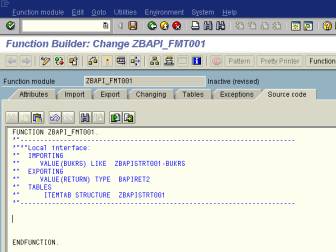
The next screen you visit is the source code. It would look like this.

In the source code tab, write the following code in order to pick the data based on the input you provide. 

Now, save and check the code and activate the function module.


After successful activation, Go to the attributes tab. Go to Function module Release Release. 


Now we are done with the creation of a Function Module.

Go to transaction SWO1 and enter the name of the BAPI you would like to create or as shown in the screen and click the create button. 

Give the name of the BAPI as above and click on create. 


Give the above-mentioned details and click on the continue icon. 


Save in a package. 
The resulting screen is as follows. 


Now click on the methods to drop down and see what methods are provided by default. There would be two methods, showing in red color which come by default while creating the BAPI.


Click or select the method as shown above and go to the path “UtilitiesàAPI methodsàAdd methods”. 
On the screen that follows, provide the function module name and click on the continue icon.


In the ultimate pop-up, click the next step icon. We observe that the information is predefined in the fields.
This is the next screen where you would just click on the “next” icon. 


Click on Yes. You can see an information message reading “ ZBAPIFMT001” inserted.


Now save after you add the method. Select & Double click on the API method.

Go to Tab: ABAP Check 'API Function'. 


The above screen is displayed. Go to the ABAP tab as shown below. 


Select the Radio button reading “API Function” as already said above. 


click on the continue icon to proceed further. 
Now select the Object “ZBAPI_T001” as shown below. 


Go to : Edit Change Release Status Object type To Modeled. 


The above shown screen will be displayed. Click on yes.

The message shows, The object type status set to modeled. (or already modeled) 
Go to : Edit Change Release Status Object type 
To Implemented.


You can see a message reading “Object type status set to implemented” 
Now, go to: Edit Change Release Status Object To Released.


There would be two pop ups coming up. Click continue on the Pop Ups. 
Keep the cursor on the 'Method'. 
Go to: Edit Change Release Status Object type component TO Modeled. 


You can see the message reading “ status for method ‘zbapifmt001’ set to modeled”. 
Now, go to: Edit Change Release Status Object type component TO Implemented 


You can see the message reading “ status for method ‘zbapifmt001’ set to implemented”. 
Now go to: Edit Change Releasse Status à Object type component To Released 


You can see the message reading “ status for method ‘zbapifmt001’ set to Released”. 
Click on Generate Button. (the red ball kind of button is the Generate button) 


After clicking on the generate button, you can see the message reading “Object type 'ZBAPI_T001' generated successfully”.


Now go to BAPI Tcode (BOR) there we can find the BAPI (our BAPI) 
The BAPI browser would look like the screen below. 


You can click on the Alphabetical tab so that you can browse the BAPI’s in an alphabetical order. Find your BAPI as shown. 


Now we are done with the creation of a BAPI.

Test Your BAPI. 


Enter the name of your BAPI in the transaction SWO1 and click on ‘Test’. 


The above screen is displayed. Click on the Execute icon against the BAPI as shown. 


The above screen is displayed where you would require entering the data against the empty input fields. 


We have entered some data in the Field. 
After entering the data, click on the execute icon as shown below. 


The following screen is displayed which has some values as is indicated by the ITEMTAB. 


Click on the Edit table icon as shown below. 


The results as per our input are as shown below. 


By this, we would get it confirmed that our BAPI is working properly. 
We can even check it by passing different values again. Come back to the input and execution screen. 


After executing the BAPI based on the input provided, we get the following screen. 


Hit on the execute icon.


In the above shown screen, hit on the edit table icon. 


The above is the output we get from the input we provided. 
We are now done with the creation and successful execution of a BAPI.